Any camera can be pointed at a busy surgical field. What decides whether the footage is usable or not is how well that camera captures focus and light. In a constantly changing environment with powerful spotlights, deep shadows and objects moving in and out of the field, it can be difficult for more basic cameras to keep up.
The Titan camera system doesn’t need to keep up. It’s already ahead of the curve with advanced software that takes advantage of specialty hardware tools designed specifically for the OR.
A case runs for hours. Every time you move your head or look away that camera comes with you. Editing that footage down can take hours.
Titan saves you that time. With its speciality software the camera can log its own position and create markers that you can import into an editing software. The system keeps the full recording, and lets you know what needs to be removed.
Nothing deleted
SmartCut writes in and out points. The recording is never modified without you.
Self Contained
Data is written to a storage drive when the recording ends.
NLE Agnostic
Marker data is written in XML and loaded with an EDL file. It’s compatible with Davinci Resolve, Premiere Pro, and Final Cut.
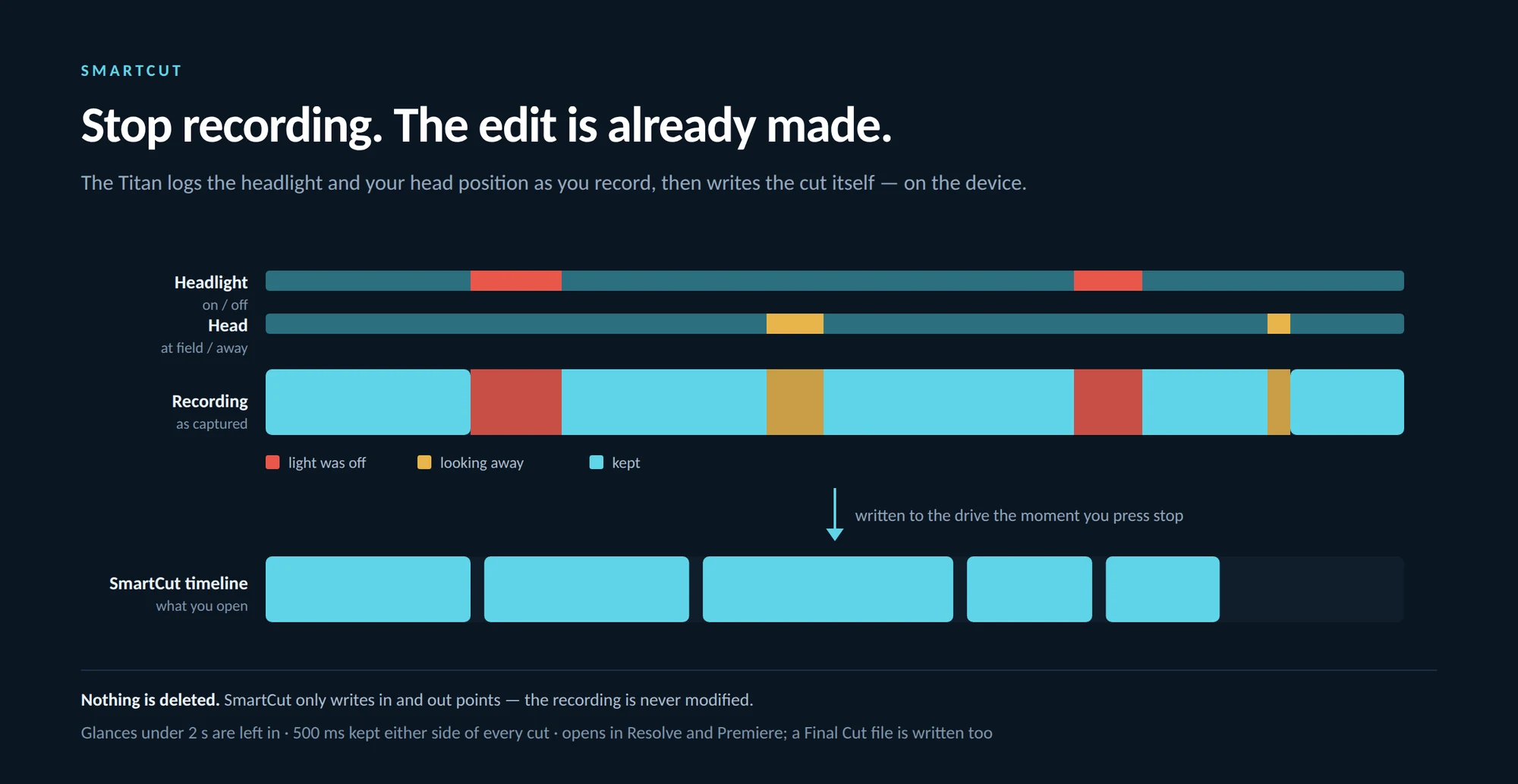
The system is deliberately forgiving. Glances under two seconds are not registered and half a second of padding is added to each marker.
The Titans custom light technology has several options for courtesy and convenience. Our Eclipse application that comes on your system allows you to set a fixed position for the light to register as its working placement. When you move your head away from that position, the light automatically dims down to OFF without you needing to touch anything or adjust the head mount. When you return, Eclipse reactivates the light and turns it back to the selected brightness.
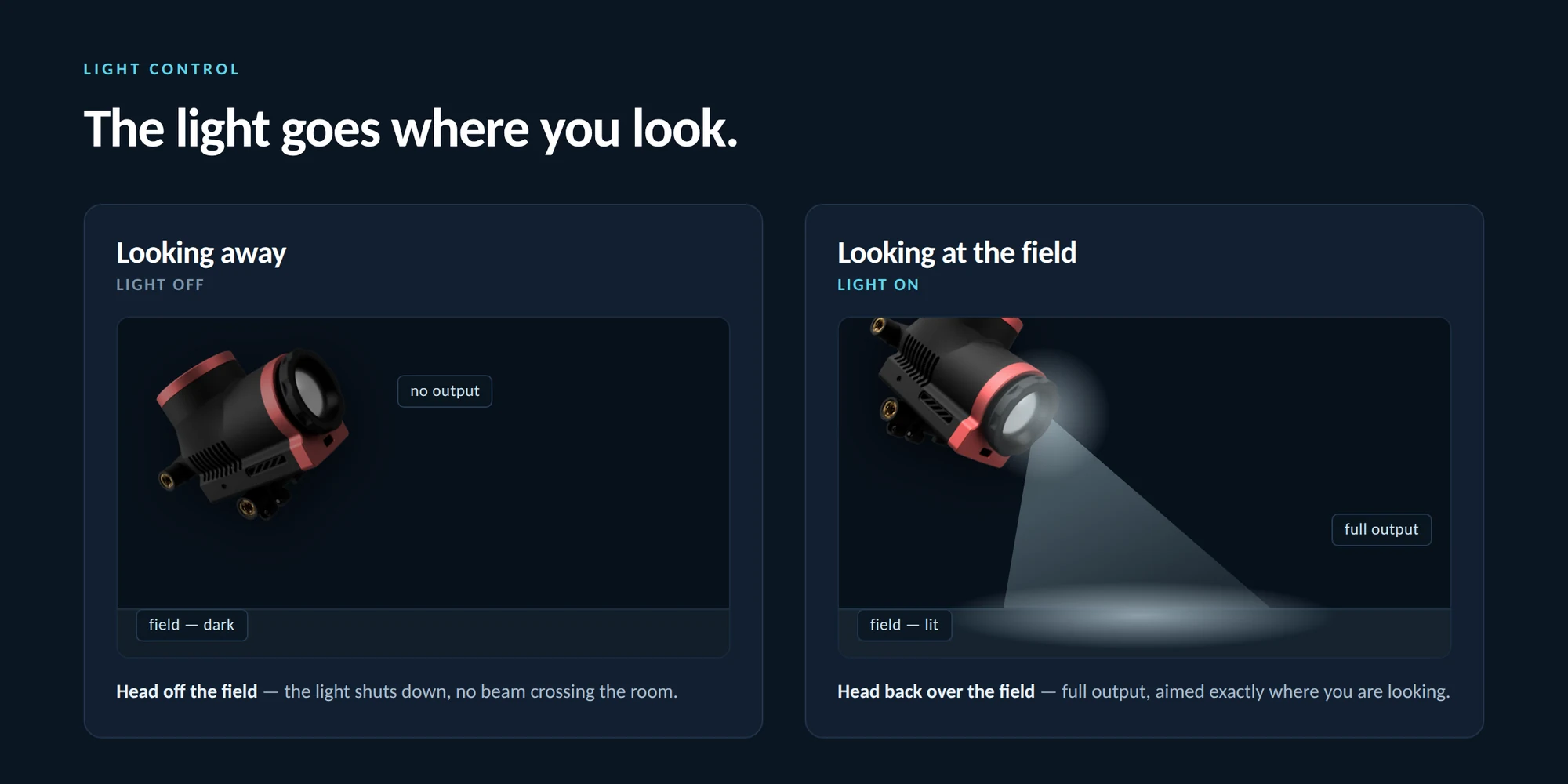
Look-away behaviour: Away from the field, no output. Back on it, full output — with nothing to touch and no mount to adjust.
Close-up dimming
Eclipse controls the power of the headlight, so you never need to worry about it overheating when placed down suddenly. Safe guard tech registers the placement of an object close to the light and turns it off.
Streaming is deliberately independent of recording: starting or stopping a stream neither starts nor stops a recording.
Voice runs in both directions. The surgeon is heard by everyone watching, and everyone watching can be heard in the room — a colleague can ask a question mid-case, or a proctor can talk a step through, without anyone breaking scrub or reaching for a phone.
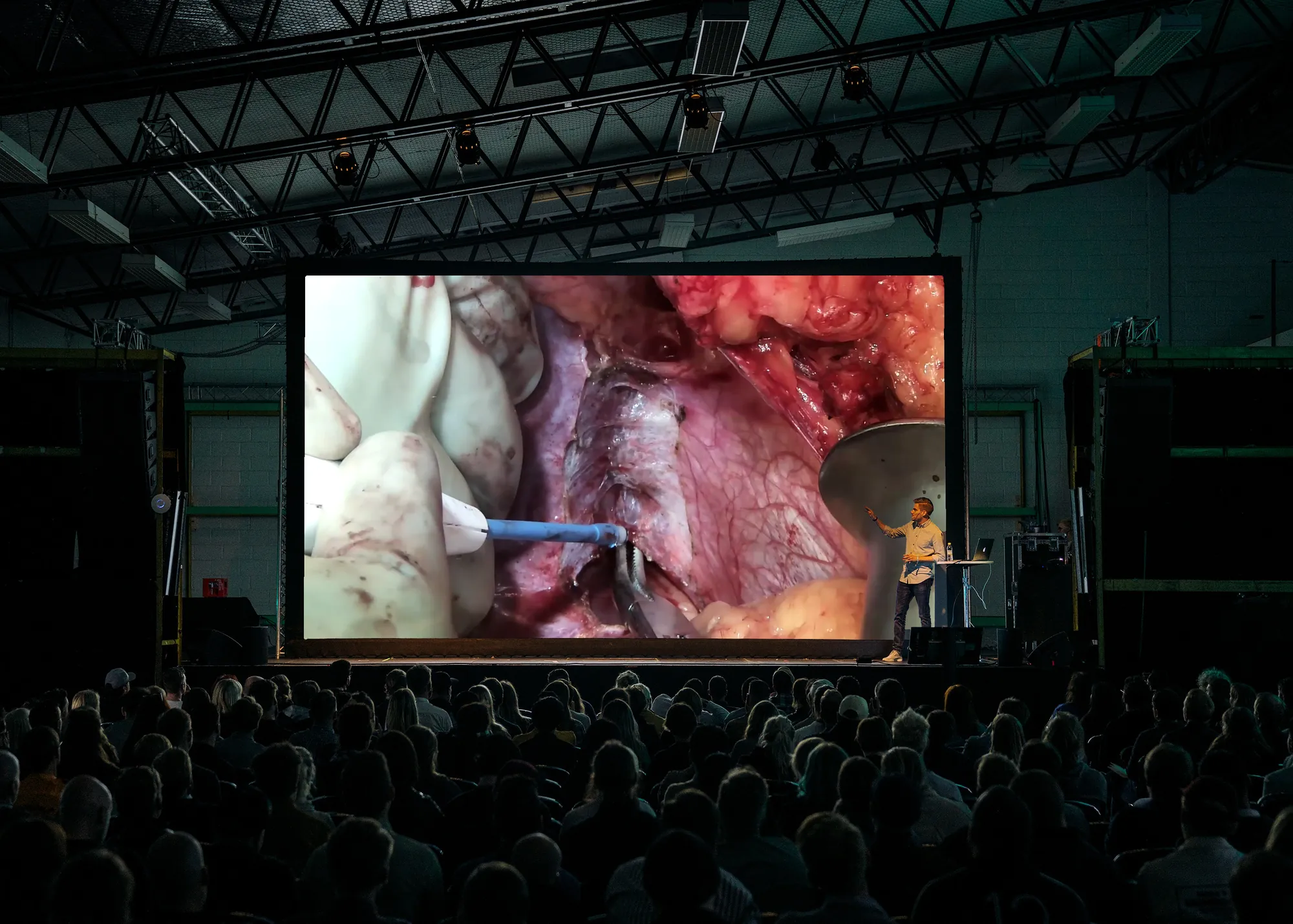
No software for viewers
They open an address in a browser and sign in. Nothing to install, nothing to schedule.
Private Access
A local session streams inside the network the system is already on, so a user with secure credentials can access the stream from anywhere, but only if they have prior authorization.
Talk-back is held, not toggled
A microphone cannot be left open by accident — and with it off, the viewers’ page shows no button at all.
Good footage can be ruined by harsh rolling black lines down the screen. This is a common problem with OR lighting and while it seems like a camera problem, it's actually a lighting problem.
Surgical LED’s turn off and on hundreds of times a second, flickering at a variable rate. Each light is slightly different. When the flicker doesn’t match up to the camera’s shutter speed, it causes Shutter Banding. Adjustments to that can be made by altering exposure.
Titan measures the room rather than guessing. A scan can report the light's flicker rate, and correct the camera's exposure setting to a round number that matches up with that. Canceling out the banding inside the sensor.
Different lights, different speeds
Titan compensates for common light cycles.
Scanned not Guessed
The fixture's flicker rate is measured, not guessed.
Zero
Changes to the raw picture itself.
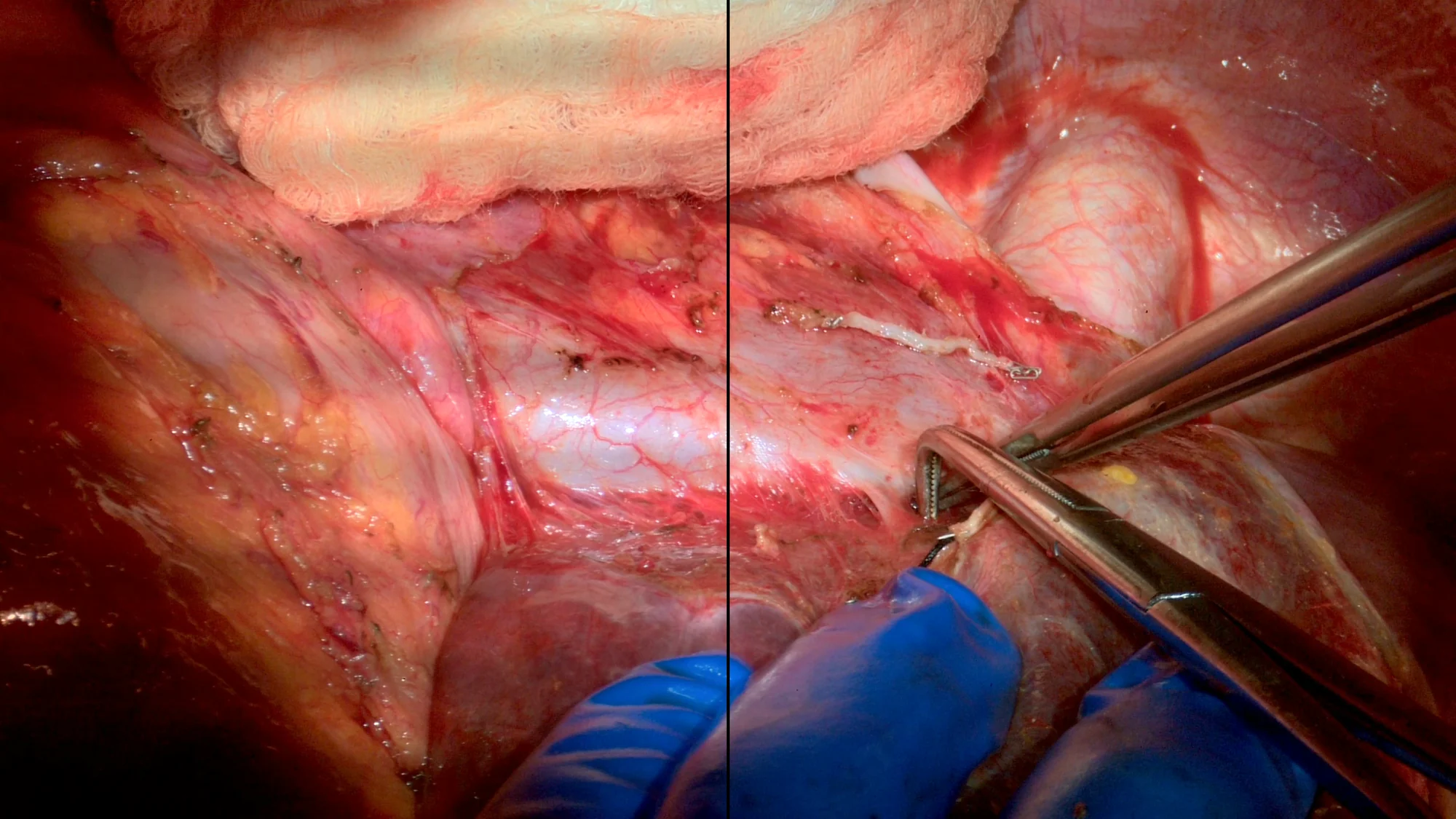
The same frame, split down the middle: the correction off on the left, on on the right.
Computer vision technology is at the cutting edge of surgical data analysis. Titan enables it. Our technology integrates with medical AI models to port data into your training sets. You can also side chain the Titan’s Hub System to record side by side. Nothing from the AI model overwrites the internal recording.
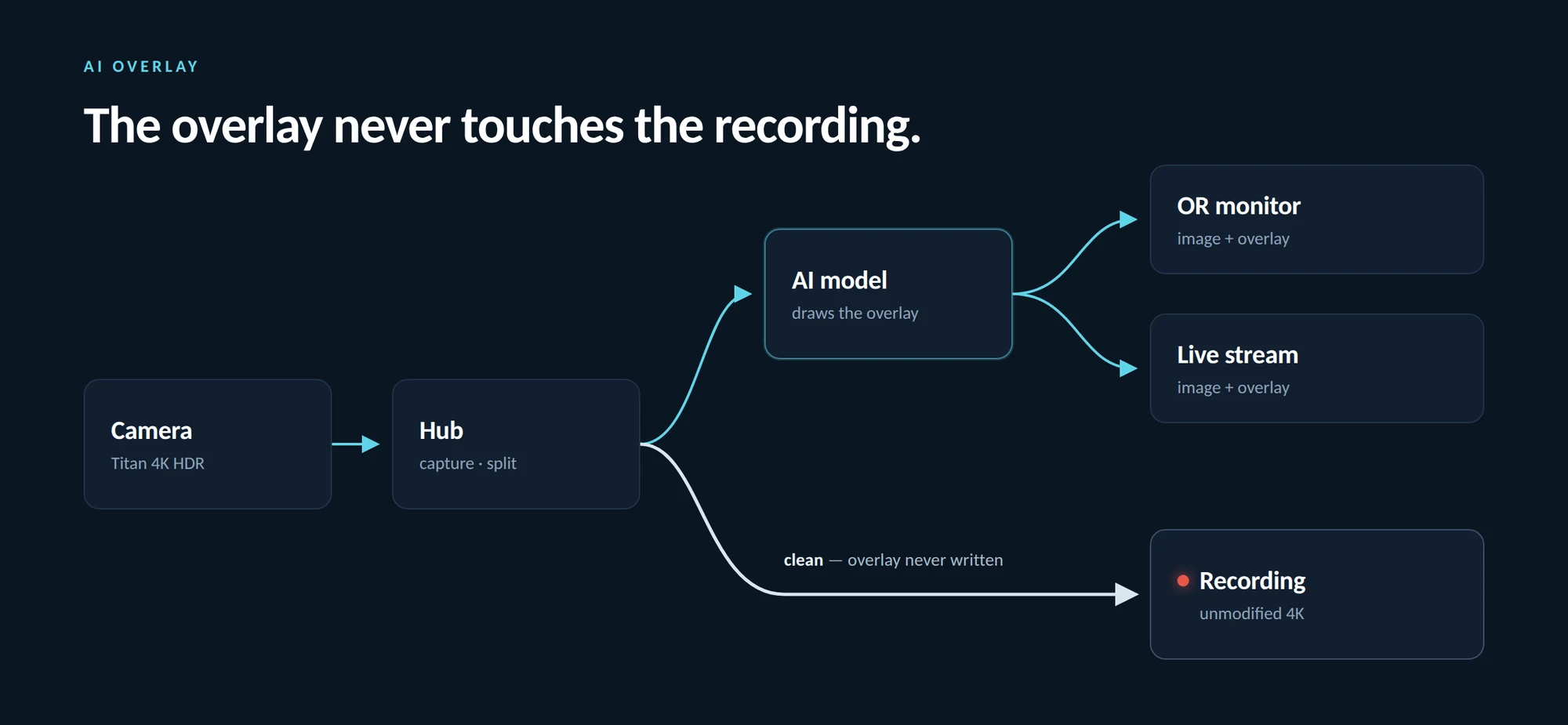
The hub splits the feed. One branch carries the overlay to the monitor and the stream; the other reaches the archive untouched.
Run in Place
AI models run side by side with the Titan’s Hub Station.
Overlay without Altering
Output draws on the monitoring channel of the stream, and does not affect the recording.
Export Training Data
Every frame already carries focus, frame rate, white balance, and other metadata. Pre-labeled context that most surgical datasets don’t have.
"The Battery Monitoring Tool allows the user to gain more information and control over the battery packs the Titan system uses.

62 percent charge, two hours and one minute left.
The Battery Monitoring Tool detects the compatible Titan battery type (BASEUS or ANKER) and displays the current charge and time remaining for each unit. To sync the battery pack with the Battery Monitoring Tool, you may need to use the manual slider to adjust the timer to the percentage remaining indicated on the batterypack itself.
To safeguard against unintentional interruptions from a low battery, the Battery Monitoring Tool lets the user set an Early Warning and Urgent Warning timer, which triggers an alert when the battery reaches the set threshold. This allows the user to track the battery's progression over time using the controlling tablet, and know when to change packs without needing to access the physical unit."
Most cameras find focus by hunting for contrast. When an object enters the foreground, the camera tries to lock onto it, disregarding the background.
The Titan measures distance instead. A time-of-flight sensor emits an infrared pulse and times its return, converting that into a centimetre-accurate reading and adjusting the focal length to match. If you need to make manual adjustments, the Titan comes equipped with focus peaking indicators to dial in the sharpest view.
You never need to worry about focus shifting and moving between critical moments.
ToF
Distance measured, not guessed
HOLD LOCK
One tap to lock focus.
FOCUS PEAKING
Edge detection for small adjustments.
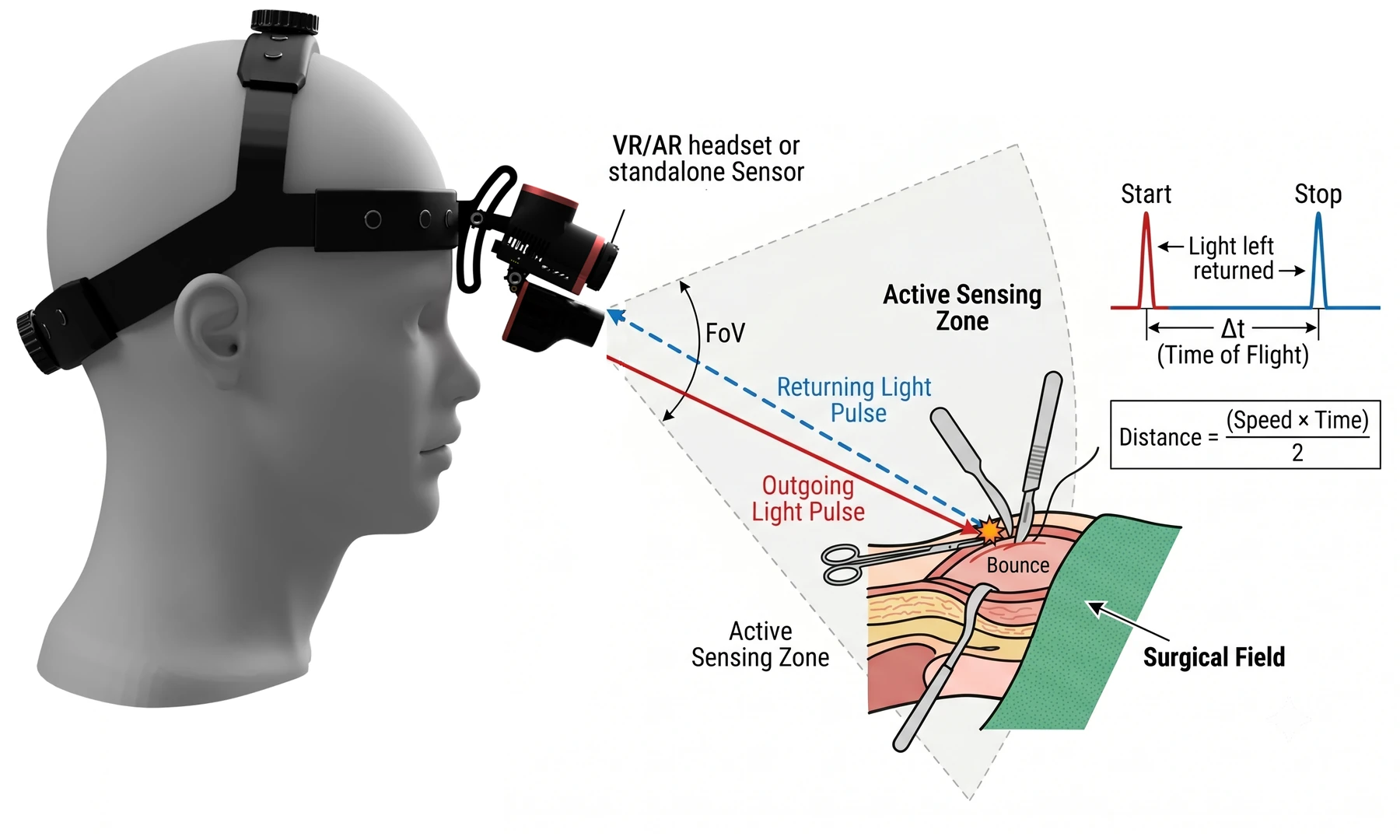
Time of flight: the camera sends a light pulse into the field and times the pulse coming back. The round trip gives the distance, and the lens is driven straight to it — no contrast hunting.
A lit cavity a few centimetres from a white drape, a gauze pad on the field and a reflective tools surface all have one thing in common. They are lit by the strongest light in the room. Powerful spotlights light up the field, but cameras need to be able to see bright areas and dark cavities. One exposure can’t hold both, and what gets lost is fine detail that can be critically important.
In 4K HDR Mode the Titan holds both ends of that range in a single frame. This process allows for rich whites and blacks, with clear visibility. Leaving light more balanced and less washed out.
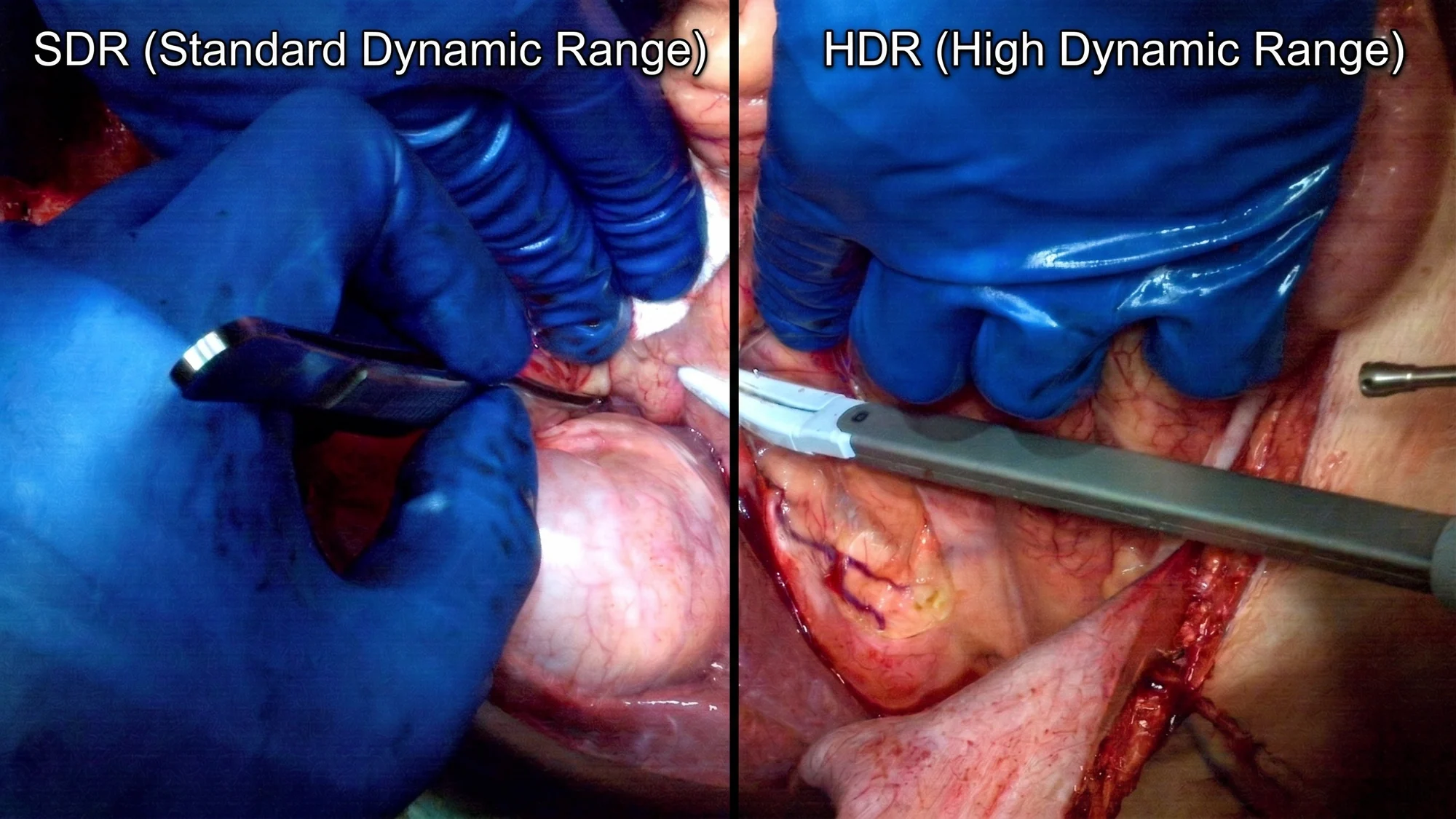
Fused in the sensor
Not a filter applied afterwards. Nothing to undo in the archive.
24 fps, and it says so
In HDR mode the Titan drops from 30 FPS to 24, adding subtle motion blur to help smooth out sharp edges.
Four Exposures per Frame
In 4K HDR Mode the Titan's sensor takes four exposures of the same field — two normal, one under, one over — and fuses them before the picture leaves the camera.
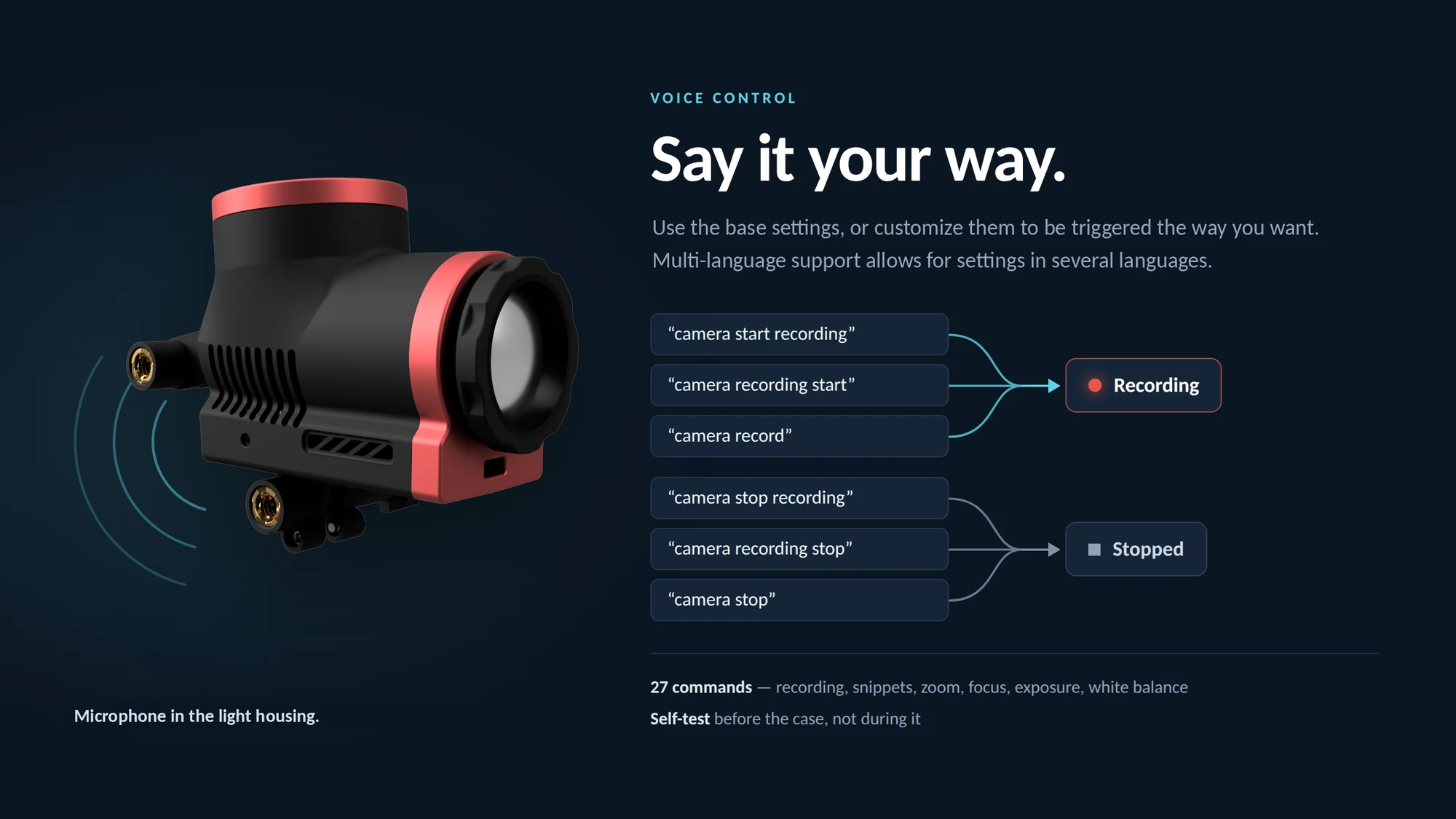
The Titan camera system is designed to give total control to the surgeon. Every major feature can be activated with voice commands. Start and stop recordings, create clips, annotations and more. Everything is registered through a microphone mounted in the light housing.
The base command set can be used as it is, or customized to your own phrasing. It is available in several languages.
Nobody scrubs a four-hour file looking for the anastomosis. A button captures a snippet of a set length while the recording carries on untouched, and a reel is assembled from those.
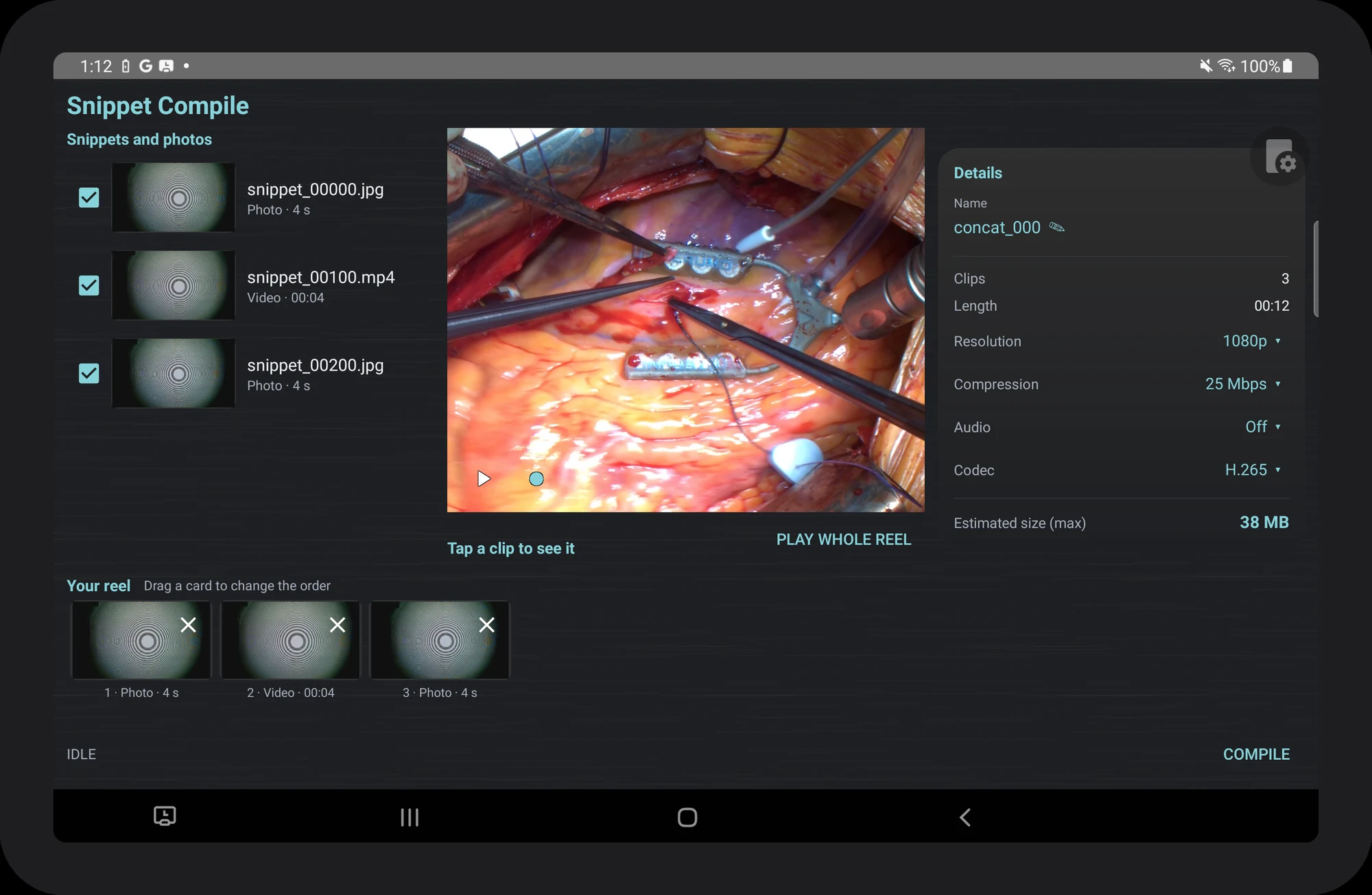
The compile screen: snippets and stills on the left, the reel along the bottom, and the output settings that decide what leaves the hub.
Mark
One button captures a Snippet of a set length, with customizable length settings between 10 and 180 seconds. Taking a Snippet does not interrupt the base file recording.
Compile
Choose the clips you want, drag to reorder, name and compile them. The Compilation Reel runs on the Hub Station, and saves the reel directly to the storage drive.
Annotate
Dictate over the case in real time with a voice command. Turn off and on audio recording when you want it.
Every mode is a different way of reading the sensor, not a filter applied afterwards. Changes take effect immediately and the picture stays live — no black frame, nothing to explain to the room.
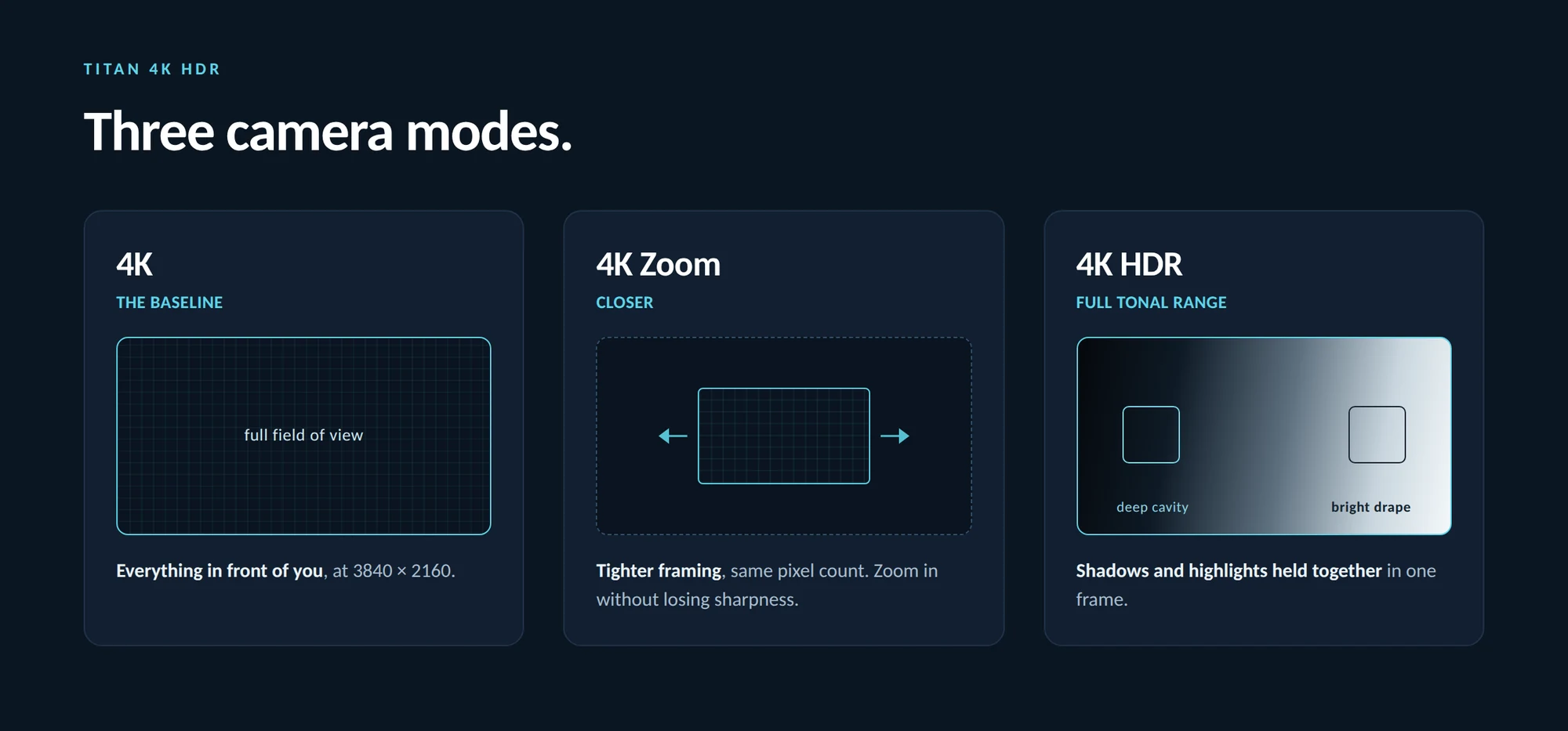
~30 fps
4K and 4K Zoom
24 fps
4K HDR — the cost of fusing exposures, and the default
Live
Switching modes never drops the picture
Automatic real time or manual white balance can be set before, or during a case, so that the Titan captures the cleanest view in every lighting situation.
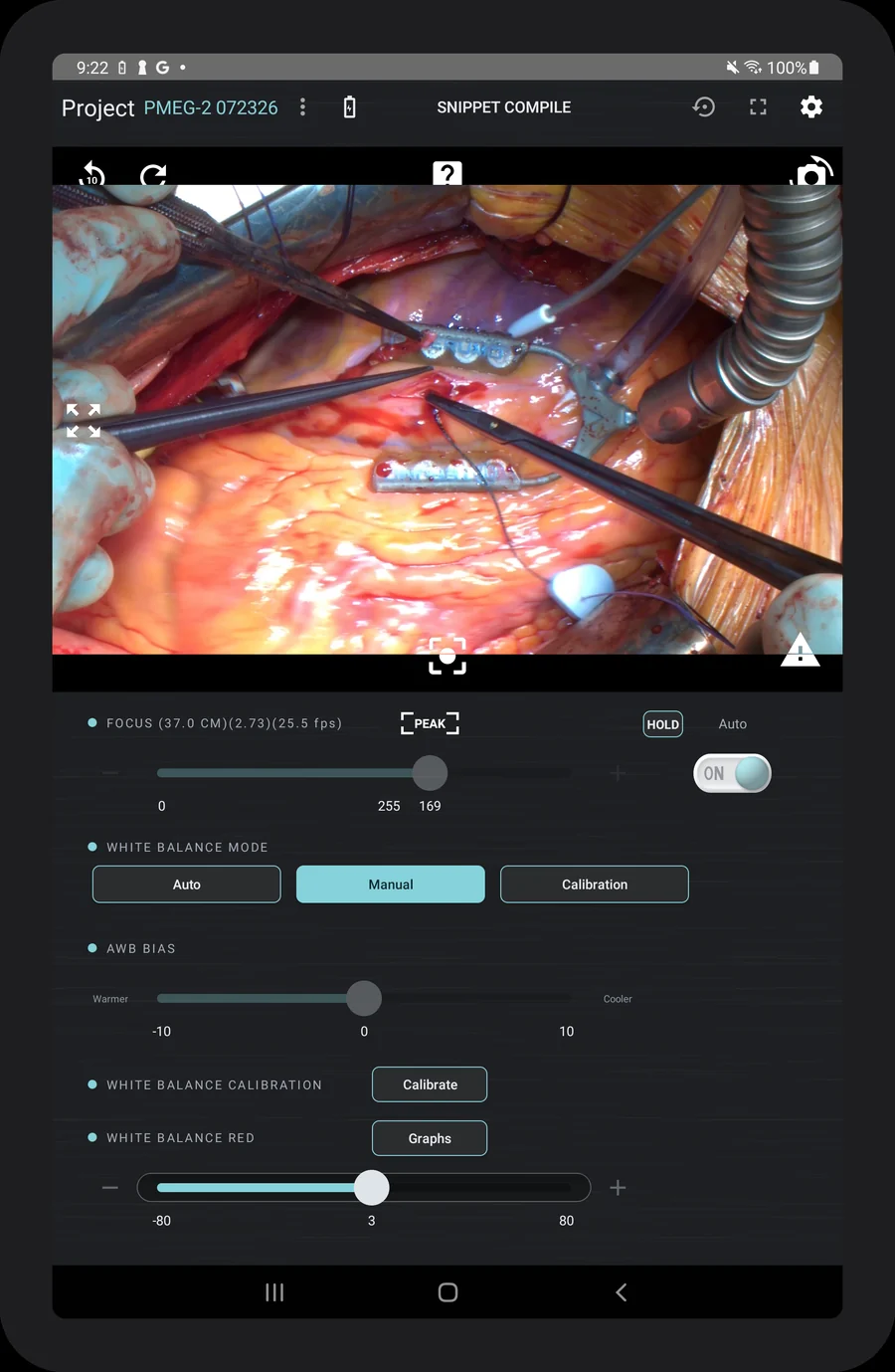
Mode, bias and trims sit on one screen, under the live picture.
Warmer
Automatic
Cooler
Auto
The camera judges the light continuously. Right for almost every case, and where a system should be left.
Manual
Hands the red and blue trims to the operator. For when the light is about to change and the picture must not.
Calibration
Measures the room from a white reference and fixes the result, instead of judging it.
Intelligent Software, for Intelligent Hardware. Download new features now through the Cinvivo application on your tablet.
